Home / Streamlining employee platform to help teams to collaborate more efficiently across borders

Streamlining employee platform to help teams to collaborate more efficiently across borders
My role
UI/UX Designer
Team
2 Designers - 1 Manager
Project duration
5 Months - Oct 2024 - Feb 2025
Company
*NDA Restricts me from naming the company in portfolio so I'll refer them as - “Market Researchers ”
Market Researchers help businesses by providing accurate, reliable market research report across 20,000+ emerging markets covering industries like Healthcare, Technology, Energy, and more.
14000+ Reports published
82% Customer retention
258+ Clients served
a global market intelligence and consulting firm headquartered in New York, with offices in Pune, India.
Project Context

Company global operations were increasing
+ 100
Their team was expanding
Current portal For reports management was severely lacking
Our process
Research & requirement gathering
Define problem
Ideation & Design
Test & Handover
Part 1 : Research & requirement gathering
We spent time talking to their employees and stakeholders across roles to truly understand their needs & what are the key problem.
Current portal for Admin, SEO & Research team was simple, Only had option to create & publish report. Team is scaling and current system is not enough to track work across team.


Current platform for managing reports

Meeting employee responses summarized
We don't know which reports are important , which are in progress / completed.
Team is scaling, multiple teams are working & it is hard to track who is working on which reports & who are collaborating.
We receive request from business team and internal seo team for reports. we are unable to distinguish it in current system.
Our platform don't have option to manage blogs, press release. We do it through our development team.
Part 2 : Define problem
Outcome : Research helped us define pain points
No proper workflow to manage & track report creation
Multiple team involvement made it harder to know track is working on which report
Team missed report delivery, because they don’t have system in place to prioritize work
Indians have glamorised nutrition & thinks its expensive & dont take nutrition seriously.
Hmw create a platform that will cater to multiple teams & user roles to collaborate better & keep track of their work to improve efficiency?
Hmw create a prioritization workflow that ensures high-value deliveries are completed on time?
Hmw expand the platform’s core architecture to support diverse content types (blogs, news, PR) without overcomplicating the user experience?
Part 3 : Ideation & design
Ideation motive : To understanding user roles & responsibility to get clear picture of how platform would be structured.
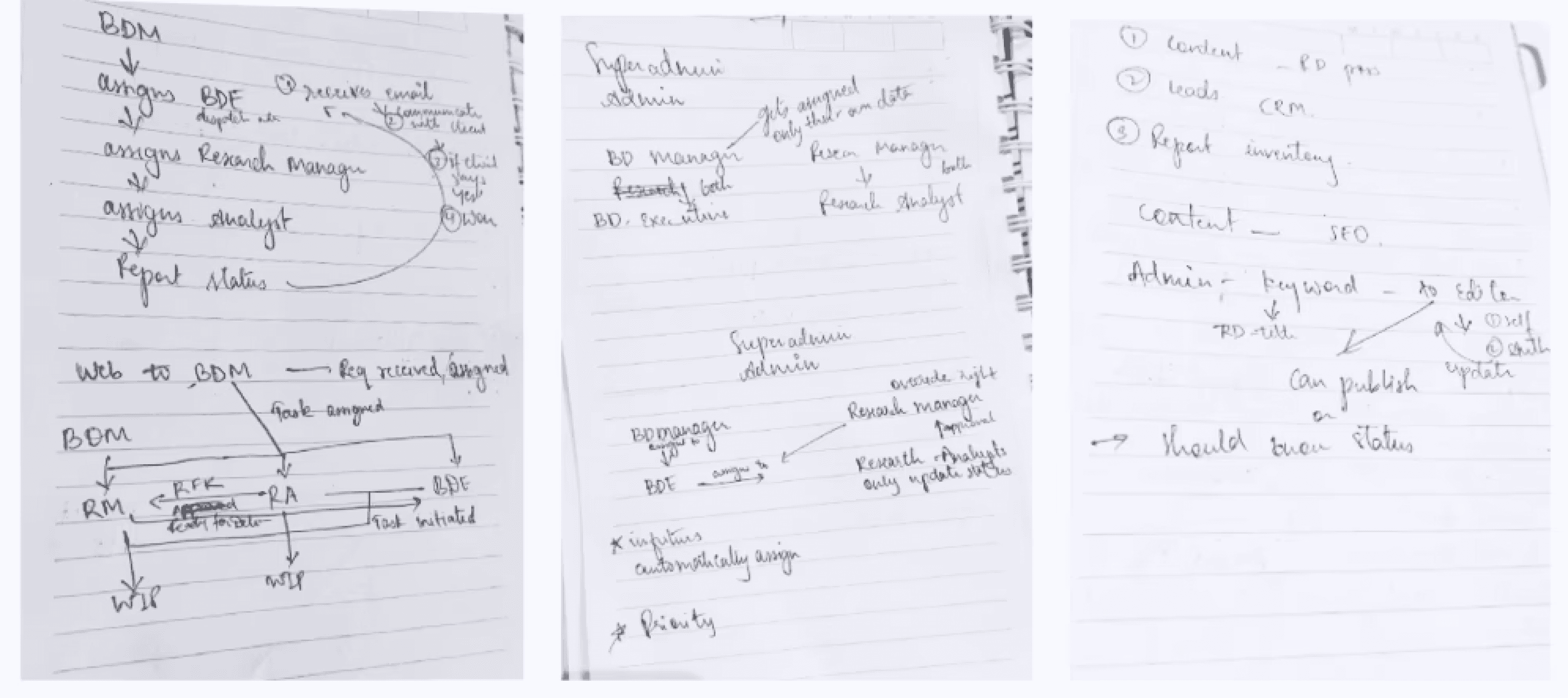
User roles & responsibilities
Admin
Can perform all actions listed under user roles SEO, BDM/BDE, RA/RE
Add user assign roles
Manage categories shown on website
View customer details
SEO
Create report request based on market trend to list report on website
Assign people to work on reports
Create / edit / publish blogs
Create / edit / publish press release
BDM / BDE
Business development manager & executive collaborate to convert lead from website into customer
BDM communicate with customer for report request generated through website for requirement
BDE assign research team to refine, create report & deliver to BDM for approval.
RM / RA
Research manager lead the research
Assign research analyst to write and refine reports
RA submits report to RM for approval
Work is marked as completed once RM approves it
Insight : We identified that content management & client management workflows were intersecting. Managing all data on single platform would be confusing for all users.
Product direction
Decision : Based on insight during ideation we decided to split the system into two dedicated platforms:
CMS portal -
to publish/create reports & content

CRM -
to manage leads & client relationship

Impact : Separating these platform will allow teams to focus on their specific responsibilities without navigating unrelated tasks. This brings workflow clarity, reduced system complexity
This case study will answer : CMS portal design decisions
HMW create a platform that will cater to multiple teams & user roles to collaborate better & keep track of their work to improve efficiency
How might we create a prioritization workflow that ensures high-value deliveries are completed on time?
Information architechture
Observation : Different users needed access to different parts of the system based on their responsibilities.
Insight : Showing all pages to every role will create unnecessary complexity and confusion.
Decision : To simplify navigation and improve usability, we structured the platform using role-based page access, where each role sees only the pages relevant to their workflow.
Impact : This reduces clutter and helps users focus on their assigned tasks.
Admin - Information architecture
SEO - Information architecture
RM / RA - Information architecture

Each role has a tailored navigation structure based on responsibilities, reducing unnecessary access and improving workflow efficiency.
Creating system before design for workflow
Ideation motive : to understand workflow between teams for report handling from creation to delivery.
Outcome : After Ideating & many iterations we created a standardized workflow that mirrors how teams handle client requests and report creation in real operations to reduce learning curve & make it easy fot each user role to adapt.

Impact : By defining clear workflow stages, we ensured each role knows when to act and what their responsibility is.

Revised solution : During workflow validation, we got feedback that the "Assigned" status did not create urgency for team members to begin work. To improve clarity & actionability, we renamed it & "Pending TO-DO".

This change ensured that assigned tasks were clearly marked as requiring immediate attention, reducing delays in task initiation.
Design direction
We explored 2 commonly used pattern for employee platform for work tracking systems like teams & slack.
Kanban style UI
Kanban was good but less flexibility, report management system needed lot of data to be consumed at front for fast decisions & less confusion.
Standard table UI
We decided to move ahead with table view because lot’s of data needed to be addressed & less learning curve for users to adapt.
Solution for SEO
Research Insight : SEO team struggled to track progress & delivery of report requests created by them for the website SEO.
Pain point : Delay in publishing report on website to bring traction & convert them into customer/leads.
Ideation stage outcome : During ideation we defined stages for report tracking & created IA for SEO to reduce clutter & help then create & track reports delivery.
Solution 1 : Design interface for SEO team based on ideation to create & track reports delivery.

Step 1 : Navigate to Report description
Step 2 : Click on add new RD
Step 3 : Select report category( Master table for category managed by admin ) & keyword, hit “Create” to create RD

Output : Once created, the report appears in the unassigned list.
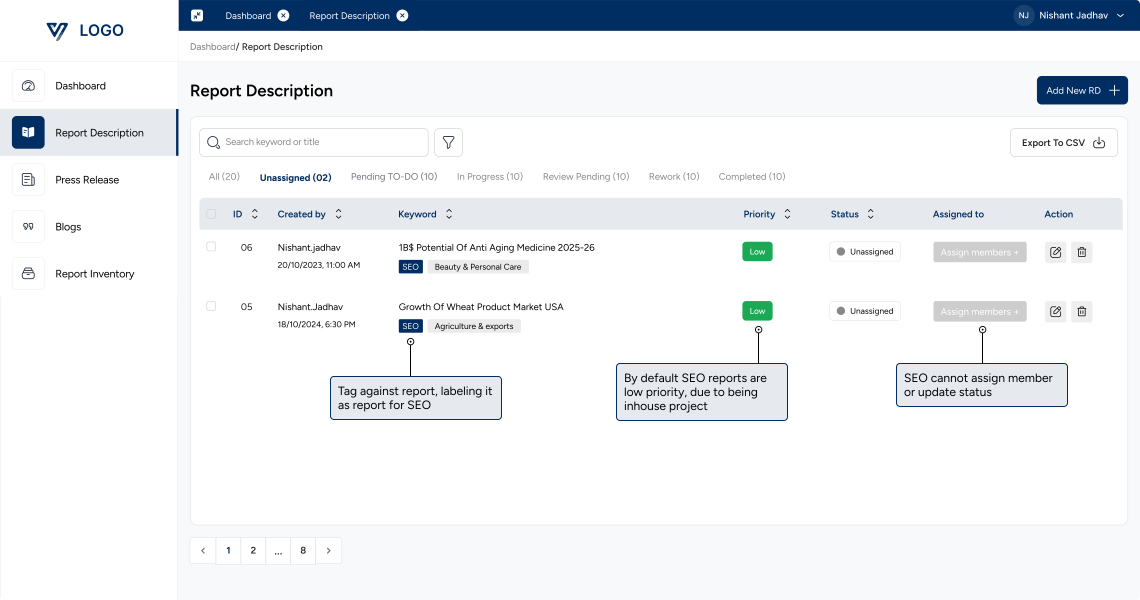
Impact : Users only see reports relevant to their role, which reduces clutter and lowers cognitive load
⚠️ Feedback : Solution 1 feedback revealed that team might create multiple request at same time (count can be into double digit also), they needed option to create request in bulk.
Iteration 2 : Help SEO team upload more than one report at a time
Ideation : we explored 2 possible direction.
Impact : Reduced time when creating many report when count is high. Minimized repetitive manual entry.

Manually add multiple report
Impact : Quick for adding 2–3 reports, no need to prepare CSV files. Simple and flexible for daily use.

Decision : We decided to keep both options to support different working scenarios.
🌟 Impact : Helped SEO team to create & track reports delivery efficiently ensuring reports are delivered on time to boost website traffic and bring more customer.
Solution for RM & RA
Research insight : During research we found out research team didn’t know who is working on which report, which reports to prioritize, difference between SEO & client reports.
Pain point : Manual coordination between RM and RA caused delays and made it difficult to track progress & deliver on time.
Ideation : We created structured workflow & system as mentioned earlier to get role & workflow clarity before deigning ui
Solution 1 Goal : Design interface for RM/RA to collaborate & reduce manual work for improved efficiency in handling & delivering reports on time.
User interface based on the workflow we ideated earlier for the collaboration between RM/RA & team
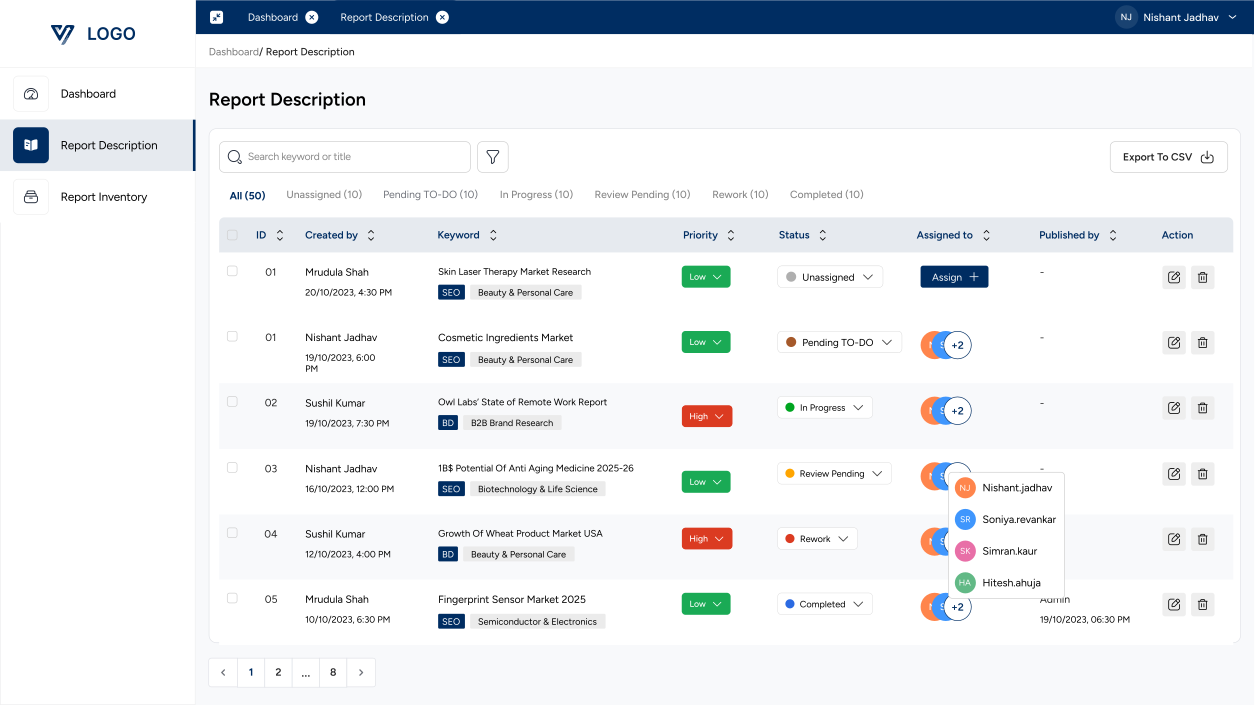
Iteration 1 : Based on research insights & workflow we identified the essential data needed to support quick decision making.
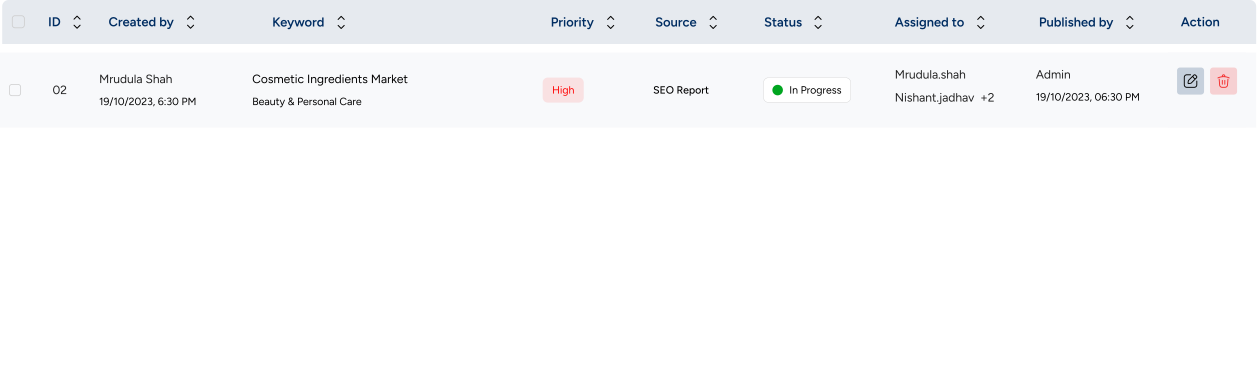
Iteration 2 : Made it more compact & scalable, easy to scan by grouping data & adding interactions

Feedback : Interface was easy to understand because workflow was discussed & confirmed in earlier stage. Allow to change status and priority from table view without having to open report details to edit
Final Iteration : Addressing client feedback for quick access

Interactions for flexibility and efficiency of use

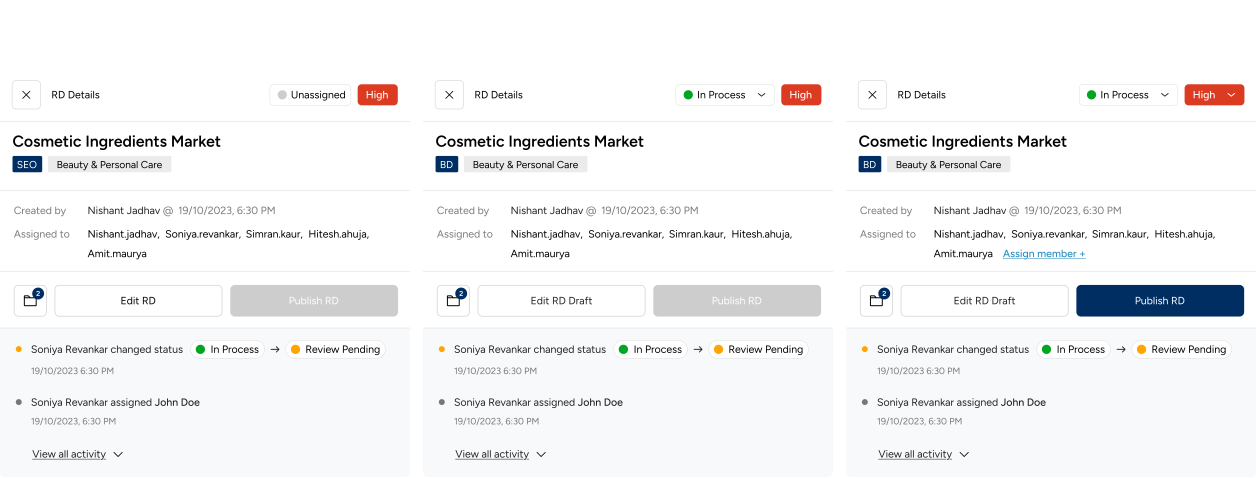
Edit popup for detailed overview of activities. Two primary action one for editing reports to edit the report draft & second for publishing report. SEO reports will be published on website & Client report will enter delivery pipeline on CRM after publishing.

Components for role based access & edge cases
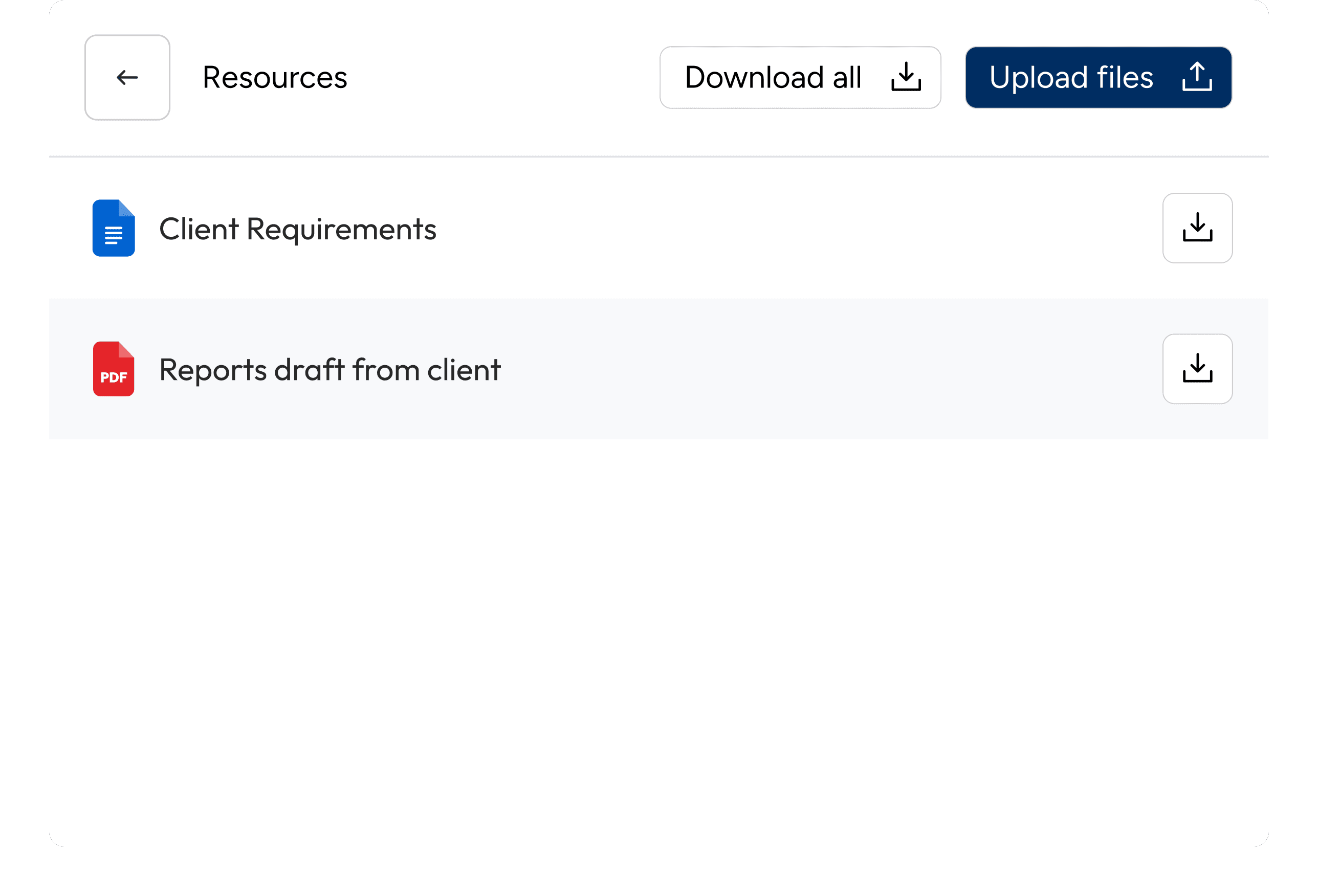
Click on folder to view & upload report related resources
Click on assign member to view & assign

🌟 Impact : Reduced manual tracking improved efficiency in collaboration resulting in faster delivery due to clarity of team work & report
More screens like Publishing report or writing report tailored to clients requirement
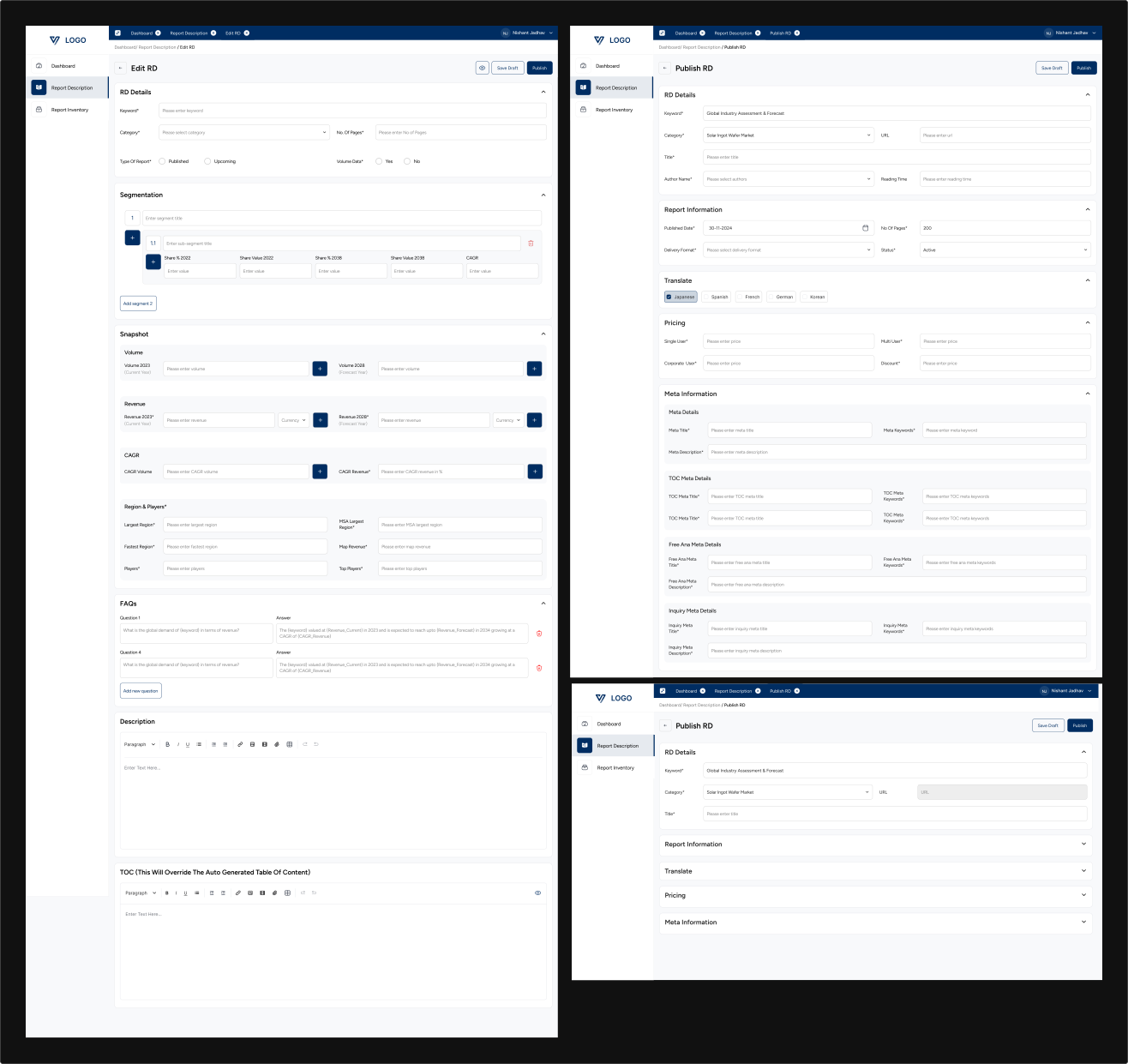
Concluding module
Through careful workflow analysis and iterative design, this project addressed critical inefficiencies in the report management process. The redesigned system introduced clarity, consistency, and automation across key stages—from report creation to publishing.
The new experience improved task efficiency, reduced dependency between teams, and minimized errors during publishing. By standardizing workflows and introducing clear validation mechanisms, the platform now supports faster turnaround times and more reliable output.
Ultimately, the redesigned solution not only improved usability but also strengthened operational control, making the system more scalable, maintainable, and aligned with real-world team workflows.
What did I learn ?
Working on this project helped me a lot to grow. Project covered some important points which helped me strengthen the foundation of UI/UX Designer.
Learned how to execute big project in small chunks
Learned simplifying complex foundation for strong product
Used AI to tailor the workflow & structure.
Designed for many edge cases based on user roles